The tool moment
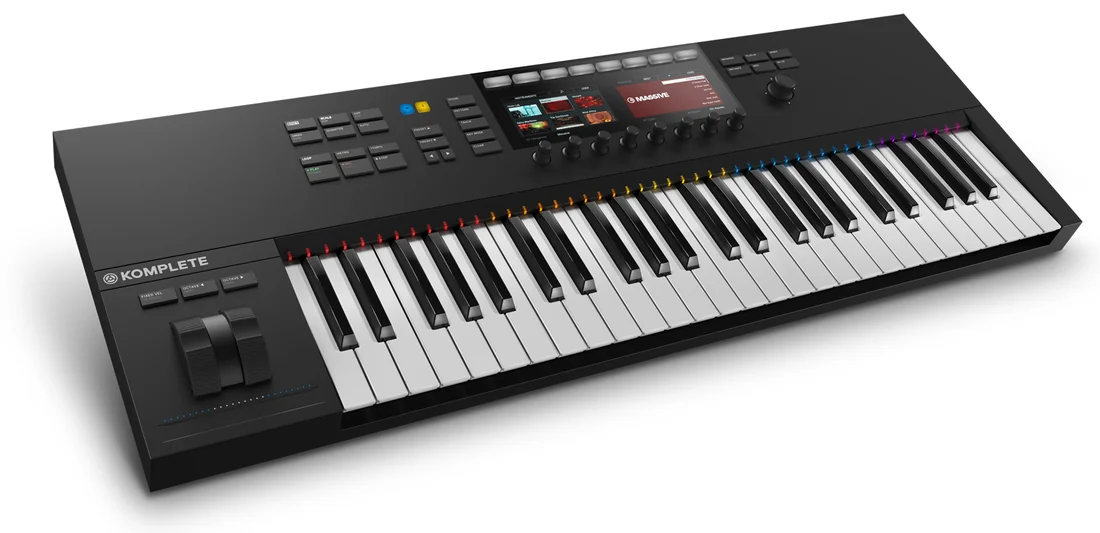
Native Instruments announced the Komplete Kontrol S-Series keyboards in a dated news post on 2 September 2014, headlined “Coming October 1st,” setting the keyboards' on-sale date and pairing them with the new Komplete 10 and Komplete 10 Ultimate bundles. The product page from the same month describes three features working together: Komplete Browser, a “tag-based browsing system” that lets a player “browse and load sounds with the push of a button”; Native Map, which “automatically maps all key parameters for each Komplete Instrument to the touch-sensitive controller knobs”; and Light Guide, LEDs above the keys that “show you key switches, zones and more in full color” and light up to show scales, chords and arpeggios during play.
What the documents show
Both documents are Native Instruments' own announcement and product copy, describing what the company built, not an independent review of how well it works. The news post is explicit about scope: the keyboards were “built to harness the full potential of the brand-new Komplete 10 and Komplete 10 Ultimate,” and the product page confirms the hardware is “also compatible with Komplete 9 and Komplete 9 Ultimate,” so browsing and mapping depended on a specific software generation, not just the keyboard. Neither page describes MIDI 2.0 support or NKS as a cross-vendor plugin standard in the terms later hardware revisions would use; those are additions from later S-Series generations, outside what this 2014 material claims.
What stays with the musician
Automatic mapping and tag-based browsing changed who has to remember which knob controls which parameter, not who decides which sound belongs in a track. Native Map puts an instrument's key parameters under the player's fingers instantly, but choosing which tag-matched patch serves the arrangement is still an ear-led decision, made faster to test but not made for the player. The Light Guide's scale and chord feedback can keep a performer inside a key, but it does not choose the notes that make a performance expressive rather than merely correct.
Judge it by listening
Native Instruments' materials describe workflow speed, not sound quality, so the fair test is whether faster browsing changes what actually gets used in a track. This is editorial guidance beyond the source: track how many browsed-and-loaded sounds from a Komplete Browser session survive into a finished mix versus how many were auditioned once and discarded, since a faster browser can just as easily produce more discarded ideas as better ones.
- Does tag-based browsing turn up sounds a player would not have searched for by name, or just the same favorites faster?
- When Native Map assigns a knob automatically, does the player still check what that knob is doing before performing with it live?
- Does the Light Guide's scale lighting change what notes get played, or just what mistakes get avoided?
Komplete Kontrol's 2014 pitch was about removing friction between a player's hands and a software instrument's parameters; Native Instruments' own copy never claims the hardware chooses a sound or a performance, only that it gets a chosen sound under the fingers with less menu-diving in the way.
Sources & reading trail
Native Instruments' own dated news post (2 September 2014) announcing the S-Series keyboards and setting their on-sale date as 1 October 2014.
Source published: 2 September 2014 · Retrieved: 16 September 2026
NI's own 2014 product page describing the Komplete Browser tag-based browsing, Native Map automatic parameter mapping and Light Guide feedback system as launch features.
Source published: Not established · Retrieved: 16 September 2026
Documentation, papers and the makers' own records establish the note; the judgment about what stays with the musician is Mix & Meaning editorial analysis. This retrospective draft does not imply the site published on the event date.