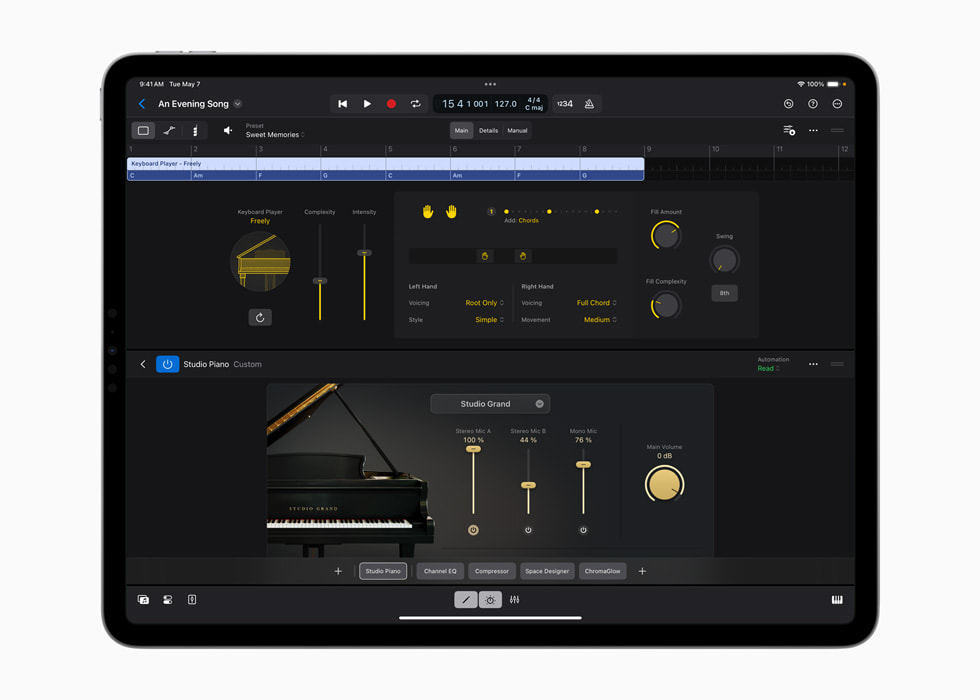
Apple’s Keyboard Player announcement image shows Studio Piano within a Logic project.
Apple · Source ↗Published with the May 2024 announcement; it does not document the current feature set.The announcement and the release event
Apple announced Logic Pro for Mac 11 and Logic Pro for iPad 2 on May 7, 2024, saying they would be available May 13. The announcement introduced Session Players, expanding Drummer with Bass Player and Keyboard Player, alongside Stem Splitter and ChromaGlow. This distinction is worth keeping: May 7 is the source-post date and announcement event; May 13 is the stated availability event. The historical feature set belongs to that announcement, not to every later version of Logic Pro.
Assistance that lives beside the arrangement
Session Players were notable because the proposed performance sat in a DAW project already full of decisions. A producer could work from chord and section logic rather than receive a sealed audio file. That makes the right question less “did it play well?” than “did it understand the role?” A bass part can be technically plausible while stepping on a kick pattern, announcing every chord change too literally, or removing the suspense of a held note. Treat it like a fast first pass from a session musician: give it a clear brief, then edit, replace or replay what the song needs.
Stem Splitter placed another kind of estimate in the same window. Separating a recording into parts can clarify a rehearsal, create an edit reference, or make room for a new idea. It does not restore the original multitrack. Keep the source region, listen for bleed and phase, and decide the use before spending hours on repair. A rough separation may be enough to study a guitar entrance; an exposed remix vocal needs a stricter listening pass.
One workflow, two boundaries
Use Session Players for hypothesis-making and Stem Splitter for analysis. Print each intervention to a named lane. With a player, annotate the reason for the chosen take—anticipation into the chorus, less activity under the lyric, a different register. With stems, annotate the artifact that remains acceptable in context. Then check the combined arrangement in mono, at low level and around every section boundary. The human job is the same in both cases: hear what the operation changed, decide whether that change serves the song, and leave a record another collaborator can understand.
This article reflects Apple’s May 2024 announcement and stated May 13 release event. It does not claim the current feature set, hardware requirements, pricing, availability or output quality.
Keep the arrangement from becoming a stack of convenient defaults. Before accepting an assisted bass or keyboard pass, mute it and ask what silence reveals about the existing rhythm section. Then bring it back at a lower level and listen for one specific contribution: a pickup, a gap filled, a countermotion, or a new harmonic implication. If it contributes none, delete or replace it. A useful assistant earns its bar-by-bar role just as a human overdub does.
Write one sentence on the lane: “kept for the turnaround,” or “reference only; bleed remains.”
The original record
- Logic Pro takes music making to the next level with new AI features · 2024-05-07
announcement, Session Players, Stem Splitter and stated May 13 availability - Extract stems in Logic Pro for Mac
Stem Splitter operation documentation; current page not used for historical availability
Original source review: 16 September 2026; individual records retain later checks. The workflow analysis is editorial interpretation; it does not report an in-house product test.