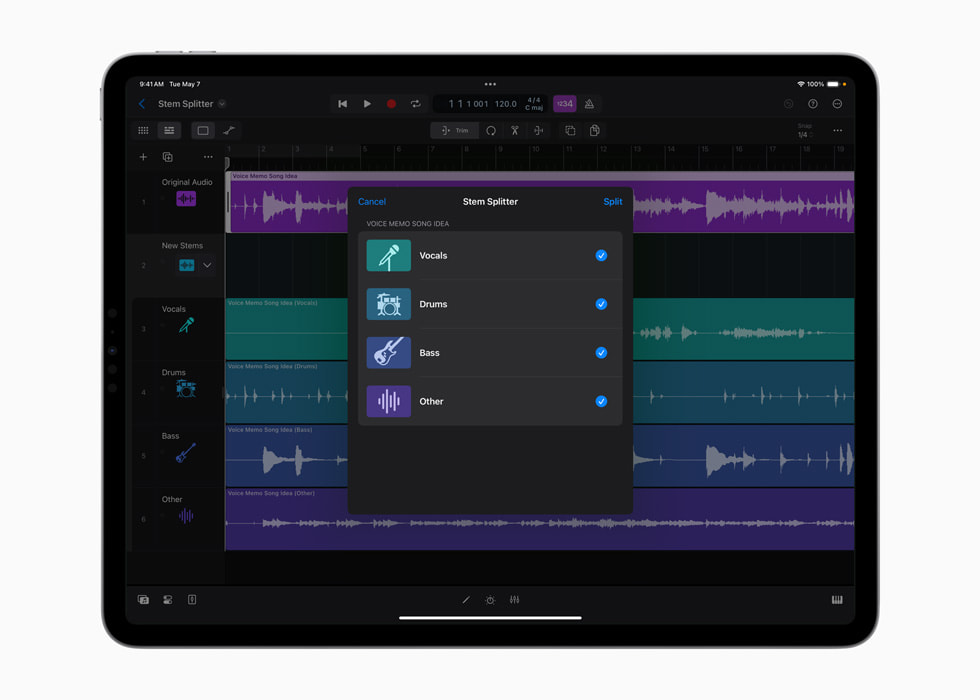
Apple’s May 2024 Stem Splitter interface shows the extraction choices beside the audio session.
Apple · Source ↗Historical interface; later versions can differ.A stem is an estimate
Separation systems assign overlapping sound to categories. Reverb, distortion, doubled parts and shared frequencies make those borders uncertain. The result may be useful without being clean, and a defect heard in solo may disappear inside an arrangement.
Keep a reference lane
Place the original mix above the separated files and align them exactly. Do not process the reference. Alternate between solo, the reconstructed stems and the intended new context. If the stems no longer sum convincingly, note whether the problem comes from timing, level, phase or material assigned to the wrong category.
Repair in order of consequence
- Trim obvious count-ins, clicks and empty tails.
- Preserve transients before applying broad denoising.
- Automate short leaks rather than gating every quiet phrase.
- Use the original ambience when a dry extraction sounds detached.
- Judge the final passage in context at release level.
Spectral repair can replace one audible artifact with a smoother but less natural one. Save versions, and stop when the fix costs more musical information than it restores.
Choose the use before the standard
A rehearsal mute, a transcription aid, a background layer and an exposed remix stem demand different quality. Write the use at the top of the track note. This prevents hours of polishing an isolation that will sit quietly under the original.
Edges / sustained notes / cymbal tails / consonants / stereo image / recombined mix.
Sources & reading trail
- Ableton Stem Separation FAQ — primary documentation or research used for the bounded claims above.
- Apple Logic Pro May 2024 announcement — primary documentation or research used for the bounded claims above.
Reviewed for this local compilation on 15 September 2026. Product terms and platform policies can change; recheck them for a release. This article is editorial guidance, not legal advice or a claim of independent product testing.