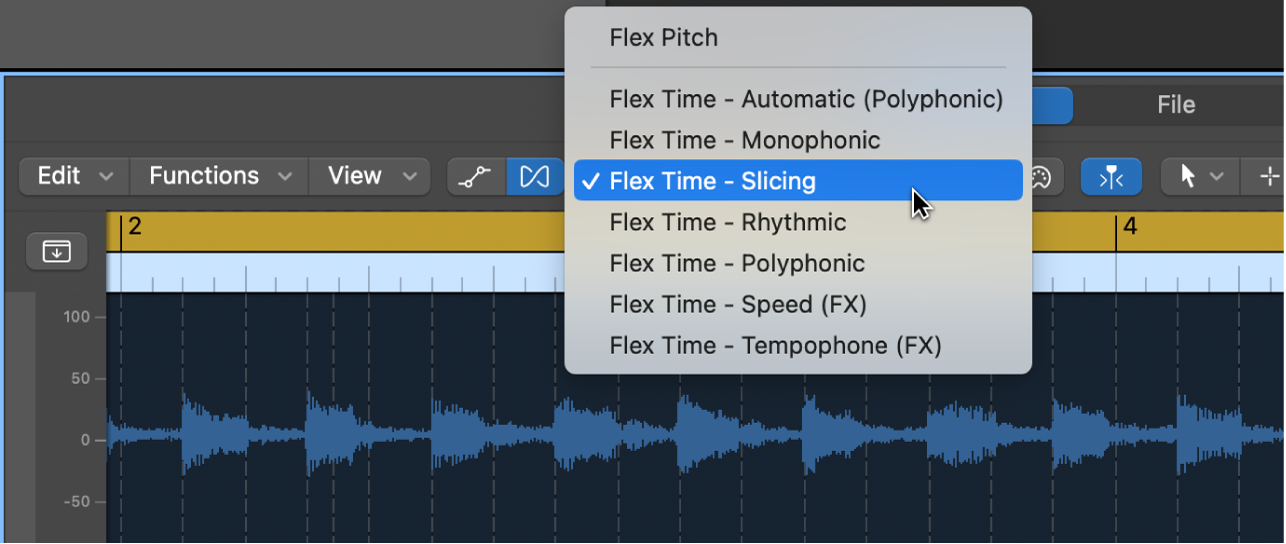
Apple’s Flex Mode menu makes the source-dependent algorithm choice visible. Tempo mapping and changing the timing inside audio remain different operations.
Apple · Source ↗Documentation screenshot, not an in-house processing test. Retrieved 19 September 2026.A free-time guitar-and-voice sketch can be the right source for a programmed arrangement, but its pauses and pushes are part of the performance. Do not begin by forcing the recording to a fixed BPM. First decide whether the session should follow the performance or whether the performance should become a new, regular grid. A tempo map changes the ruler around intact audio; stretching changes the timing inside the audio. They solve different problems.
Mark musical anchors, not every transient
Put markers at the downbeat of each phrase, at a deliberate pickup, and at any cadence where the player noticeably waits. Name them by function: “verse 2 breath” is more useful than “bar 17.” Play the guide with a click that follows those anchors. If the click feels like it is narrating the performance rather than fighting it, the map is usable.
Build the map in large passes
Start with one tempo event per bar or per half phrase. Add finer events only where a new overdub needs a reliable landing point. A map with too many tiny corrections makes later MIDI edits hard to read and can make time-based effects react unpredictably. In Logic, Adapt Project Tempo is explicitly designed to adapt the project tempo to imported audio or MIDI; beat mapping is for notes that do not follow a strict tempo. Other DAWs offer equivalent conductor/tempo tracks.
Stretch only the part that must conform
Once the map plays well, record MIDI, drums, or a new bass against it. If a generated texture needs to hold a bar-long chord, stretch that texture locally and inspect the join. For a fixed-tempo remix, work in the other direction: establish the target tempo, then use a suitable time algorithm on the copied guide. Algorithms are material-dependent: transient slicing may suit drums, while a monophonic algorithm may be more appropriate for a dry bass or vocal.
Worked example: a 12-bar sketch
A singer begins at roughly 76 BPM, relaxes for two bars before the chorus, then returns near 80. Mark the first beat of bars 1, 5, 9 and 13, then add one event for the two-bar slowdown. Program a kick only at bars 9–12 and record a pad to the mapped grid. If the vocal pickup before bar 9 feels rushed, move that tempo point; do not stretch the vocal simply to make its waveform look tidy.
Limitations
Tempo detection is a suggestion, especially with rubato, pickups, compound meter, or sparse material. A map also cannot preserve a relationship that was never played together. Keep an unwarped playlist and label any rendered version. For a generated passage, inspect its stated tempo and bar count rather than assuming the file’s metadata is correct. See how to edit the seam after local stretching, and how to preserve the groove before quantizing new parts.
Sources & working limits
- Apple: choose Project Tempo mode
Project tempo can adapt to imported audio or MIDI. - Apple: beat mapping overview
Beat mapping maps non-strictly-tempo notes to ruler beats. - Avid: Pro Tools Reference Guide 2025.12
Elastic Audio uses tempo detection and event-based warping.
Sources checked 2026-09-19. Product instructions describe the documented version; controls and availability may change. Session examples are illustrative, not measurements or listening-test results.